


01 Capacity belongs to the whole system
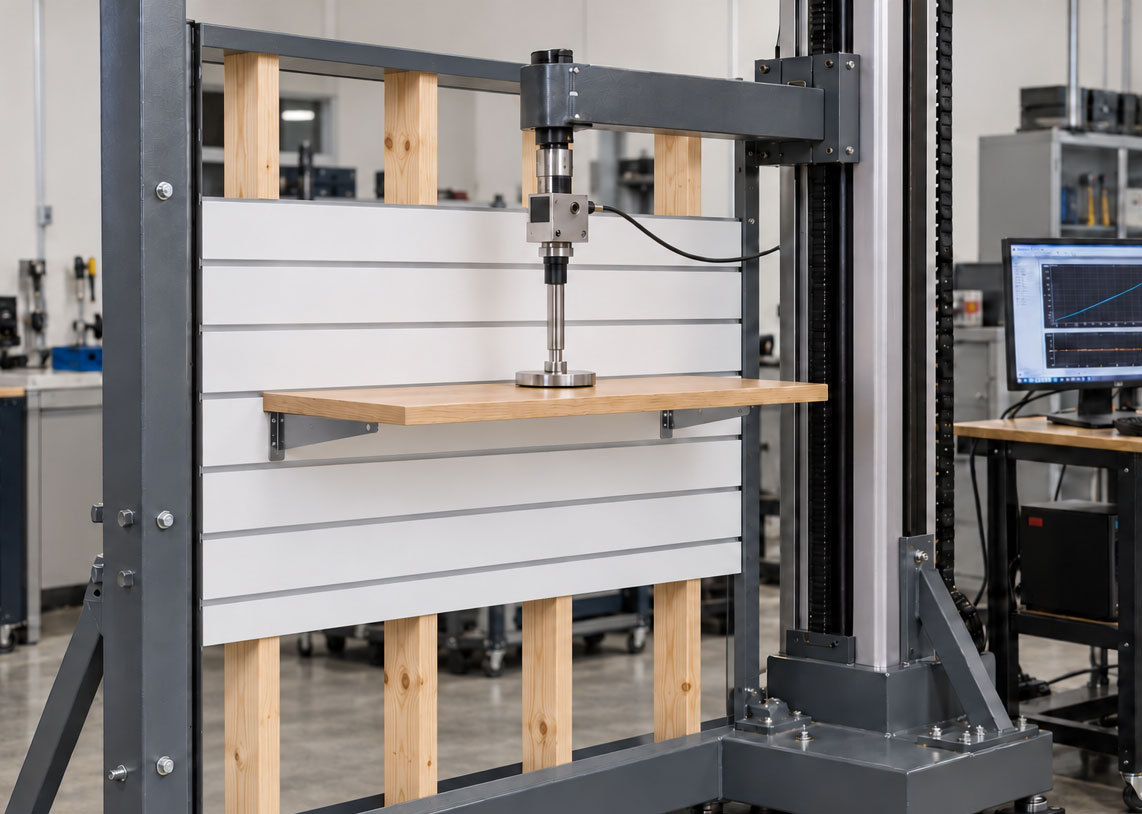
A slatwall display is only as capable as its weakest component: the panel core, groove, insert, accessory, shelf, fixings or supporting wall. A strong aluminium insert does not make an unsuitable bracket or wall fixing stronger.
Keep heavy items close
The farther the weight sits from the wall, the greater the turning force trying to rotate the bracket and pull against the groove.
02 Slatwall load capacity
Shop Fittings Store: 18 mm MDF slatwall with aluminium inserts, uniformly distributed loading and brackets spaced 500 mm apart.
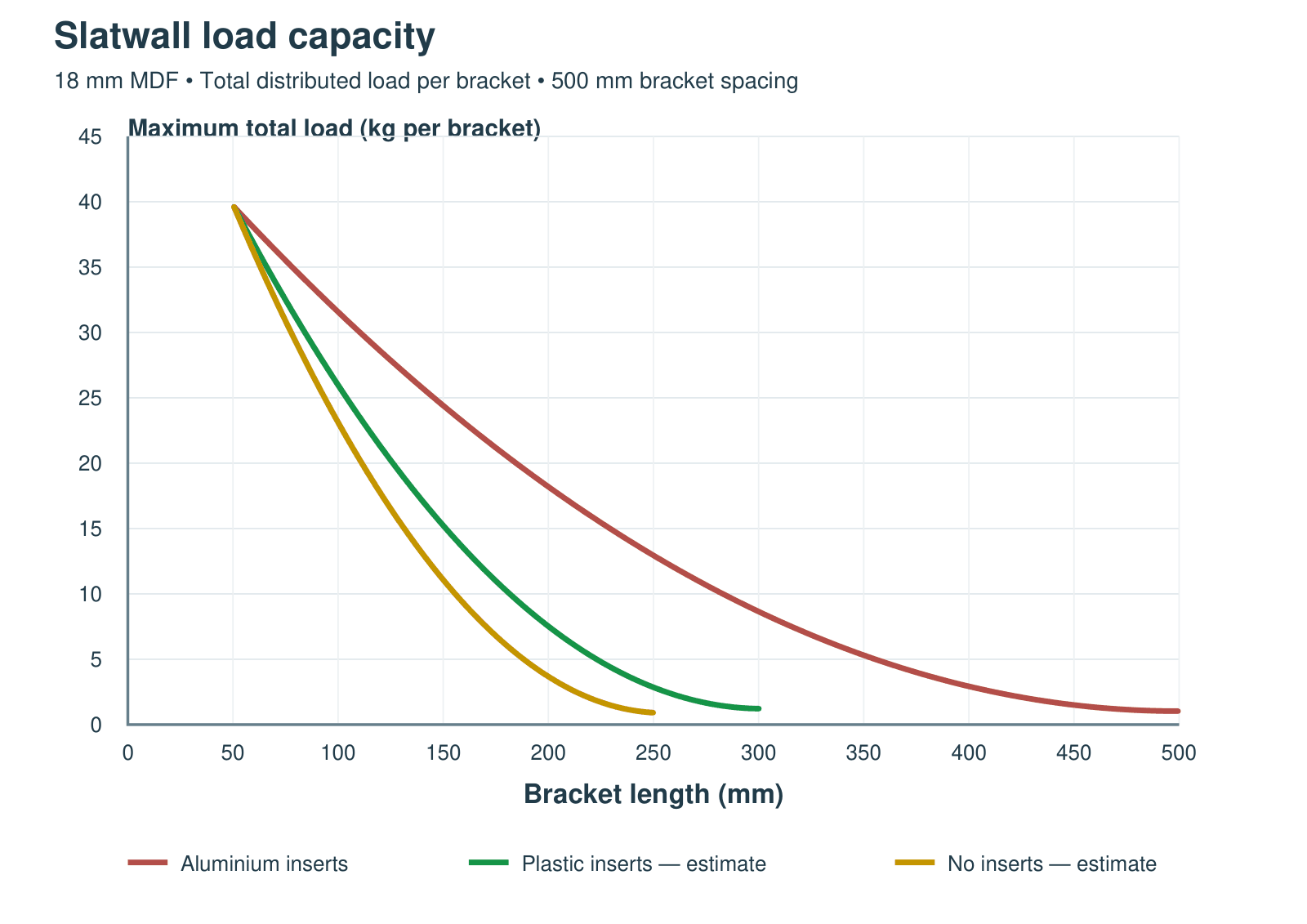 Read the bracket length along the bottom, then move up to the relevant curve and across to the load axis. Total load includes bracket, shelf and stock. The single parabolic segments are visual approximations; use the aluminium table for load values. The green and gold parabolic curves are illustrative estimates for plastic inserts and no inserts, aligned to approximately the same starting point as aluminium (50 mm, 40 kg). These two curves are not tested load ratings. Curves stop at the supplied data limits; do not extrapolate.
Bracket length — maximum load capacity
The table below gives the maximum total distributed load per bracket for slatwall with aluminium inserts.
| Bracket length, L | Maximum total load per bracket Aluminium inserts |
|---|---|
| 50 mm | ≈ 40 kg |
| 100 mm | ≈ 30 kg |
| 150 mm | ≈ 22 kg |
| 200 mm | ≈ 16 kg |
| 250 mm | ≈ 12 kg |
| 300 mm | ≈ 8 kg |
| 350 mm | ≈ 5.5 kg |
| 400 mm | ≈ 3.5 kg |
| 450 mm | ≈ 2 kg |
| 500 mm | ≈ 1 kg |
Values are approximate chart readings, not additional test points. Use only for the stated 18 mm MDF/aluminium configuration and distributed loading. The combined centre of mass includes the bracket, shelf and stock. A front-loaded shelf may have a different combined centre of mass and must not simply inherit the distributed-load rating. For lengths between rows, use the next longer bracket row; do not extrapolate outside the table.
Plastic/no-insert parabolas match the endpoints and overall curve depth of the supplied comparison, with their starting points aligned for illustration. Product-specific testing is required before using these curves as maximum load capacities.
03 Why fixture length changes capacity
A loaded fixture acts as a lever. Weight produces a turning moment at the wall. The bracket’s upper engagement pulls against the groove while its lower contact presses against the panel face. Increasing the moment increases these local forces and can cause groove breakout, insert deformation or bracket bending.
M = W × d = m × 9.81 × d
M = moment in newton-metres (N·m); W = weight force in newtons (N); m = total mass in kilograms (kg); d = horizontal distance in metres from the wall face to the load’s centre of gravity. Kilograms describe mass, so multiply by 9.81 for an SI moment calculation.
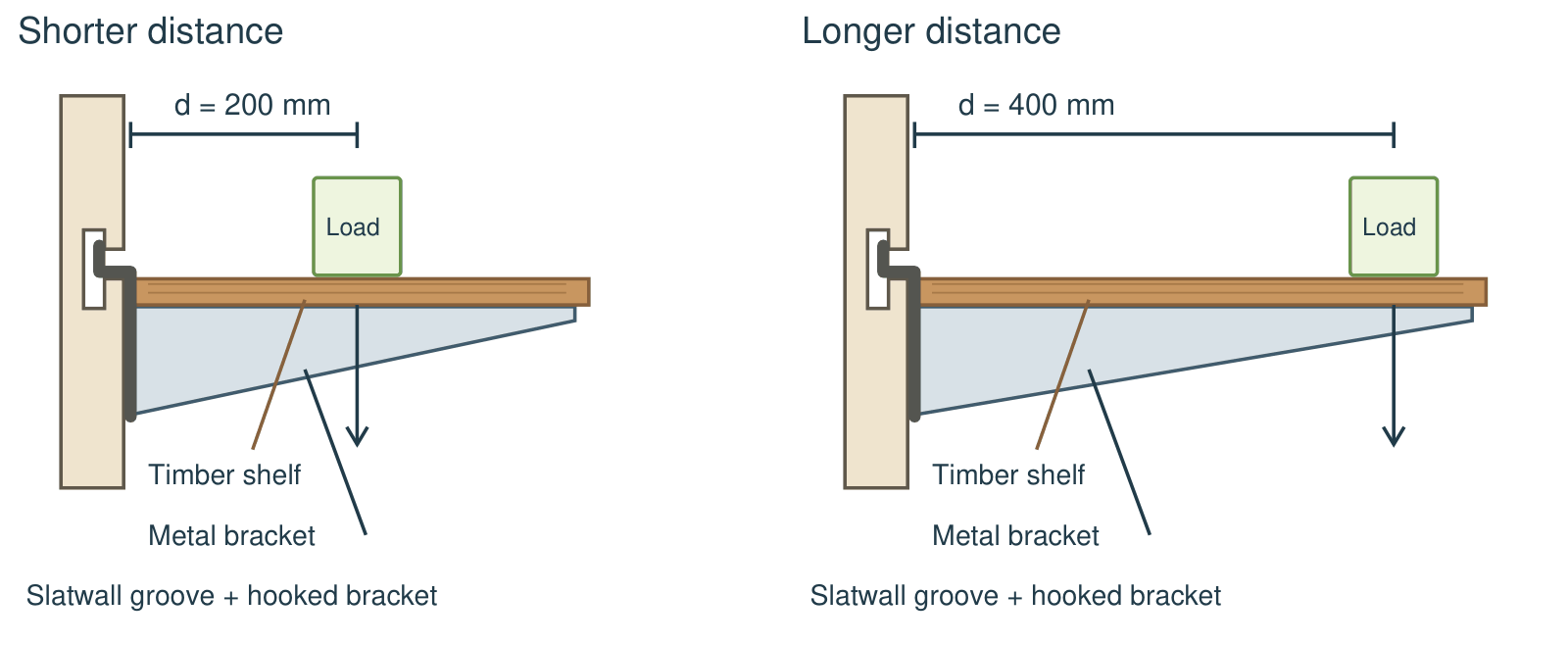 Side views following the supplied bracket sketch: a timber shelf rests on a metal bracket hooked into the slatwall groove, with its vertical backplate bearing against the panel face. The arrow shows the combined centre of mass of a 10 kg total load. Diagrams are schematic, not to scale; moment examples are not capacity ratings.
At 200 mm: 10 × 9.81 × 0.20 = 19.6 N·m. At 400 mm: 10 × 9.81 × 0.40 = 39.2 N·m. If moment were the only limit, doubling the distance would halve the permissible mass. Real assemblies also have shear, bending and fixing limits, so this rule must not replace the load chart.
Bracket length is not always the lever arm
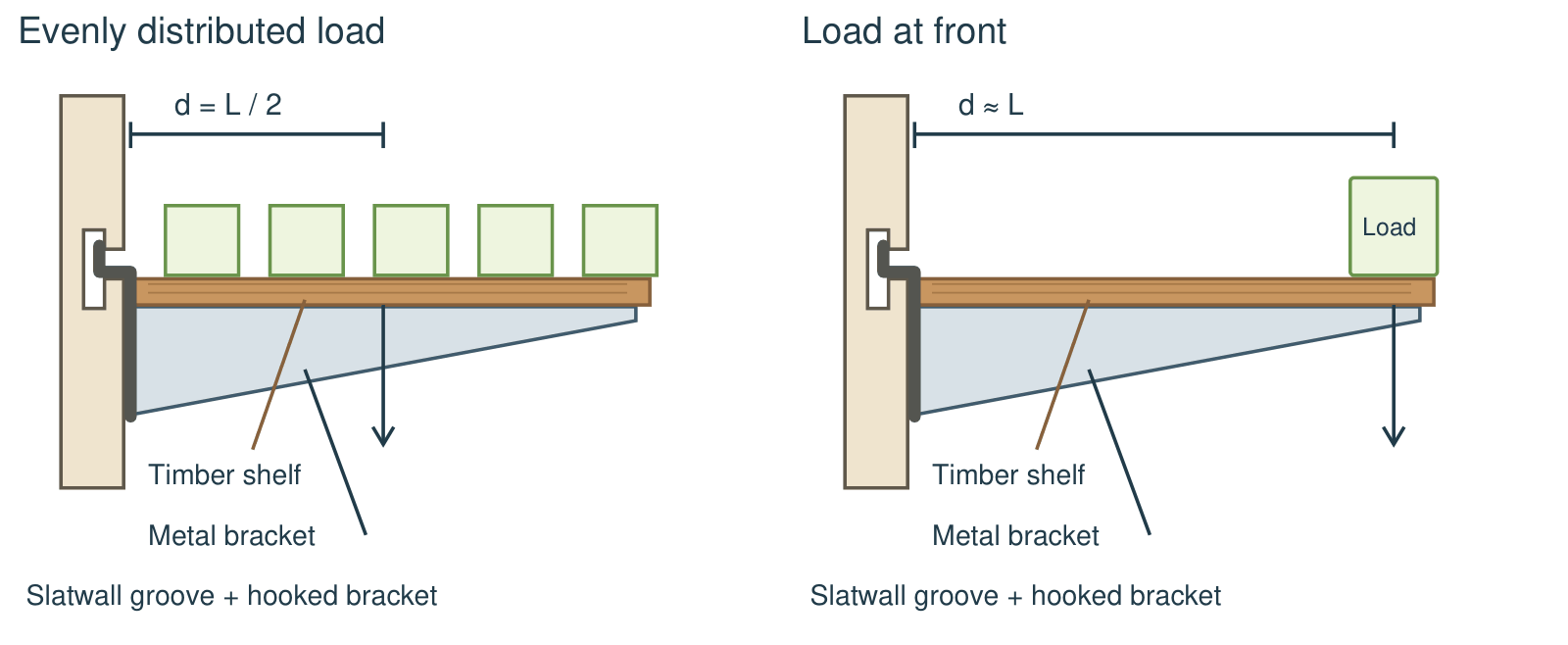 On a 300 mm fixture, an evenly distributed load acts at approximately 150 mm. Moving stock to the front increases its lever arm. The combined centre of mass must also account for the shelf and bracket.
For a uniformly loaded shelf or straight arm, d ≈ L/2. For a load at the tip, d ≈ L. A long fixture with products kept near the wall can have a smaller moment than the same fixture loaded at its tip. Waterfall arms and front-loaded shelves need particular care because products can accumulate farther out.
For several items, add the individual moments: M = 9.81 × (m₁d₁ + m₂d₂ + …). Include the shelf and accessory weights at their own centres of gravity.
04 Worked display examples
A · Find the stock allowance
For a 300 mm bracket, the table gives approximately 8 kg total per bracket under distributed loading.
With two equally loaded brackets, the corresponding combined maximum is 16 kg. If the shelf weighs 4 kg and the two brackets together weigh 1 kg, the remaining stock allowance is 16 − 4 − 1 = 11 kg.
B · Check the total moment
A 4 kg shelf plus 7 kg of stock and two 0.5 kg brackets gives 12 kg total.
If their combined centre of mass is 150 mm from the wall, total moment is 12 × 9.81 × 0.15 = 17.7 N·m. With ideal equal sharing, each bracket carries 6 kg and 8.8 N·m.
With three or more brackets, loads may not divide equally because of shelf stiffness, alignment and overhang. Adding brackets does not automatically multiply the capacity of the same groove or panel.
05 Material and insert differences
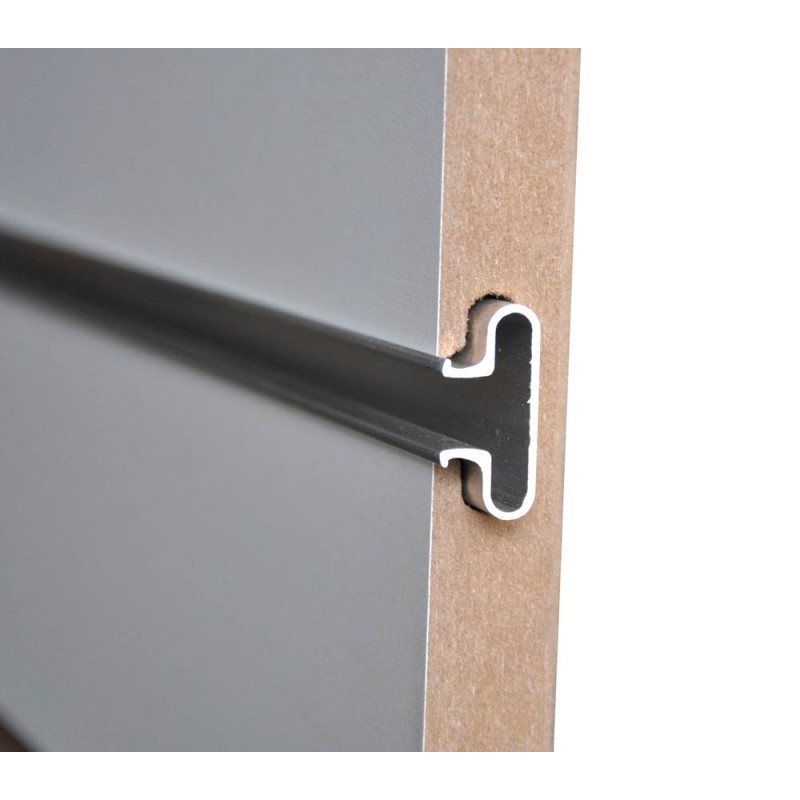 Slatwall cross-section showing how the aluminium insert fits inside the routed MDF groove. Insert wall thickness, profile shape and groove fit all affect how the load is supported.
Keep MDF dry and replace damaged or swollen panels. A decorative laminate or melamine face is not a substitute for a sound structural core.
Insert thickness and shape matter too
A thicker wall, wider supporting profile and suitable throat geometry can change how an insert resists deformation and spreads load. Groove fit and bracket engagement are essential. Thickness alone cannot establish a capacity.
Confirm the relevant panel and extrusion when ordering replacements.
| Construction | What changes | What to check |
|---|---|---|
| MDF + aluminium inserts | A stiff insert spreads the bracket’s local reaction along more of the groove. The MDF still carries that force. | Core quality, insert profile, fit and panel fixing. Use the load chart only for its stated assembly. |
| MDF + plastic inserts | Decorative plastic mainly improves appearance. It is generally less stiff than aluminium and may offer little reinforcement. | Do not assume a structural benefit without testing of that exact insert and groove. |
| MDF without inserts | The hook bears directly on the groove. Local crushing or breakout can govern the load. | Use the panel maker’s bare-groove rating; avoid transferring an aluminium-insert rating. |
| Other wood-based cores | Density, bonding and core construction vary. “MDF”, “particleboard” or “plywood” alone does not define strength. | Compare tested complete assemblies. A different core cannot inherit the Shop Fittings Store curve. |
| Solid PVC or all-metal slatwall | These are different panel systems. A solid plastic panel is not the same as MDF with a decorative plastic insert. | Use that system’s own accessories, fixing method and ratings; do not use this MDF chart. |
06 Slatwall weak points
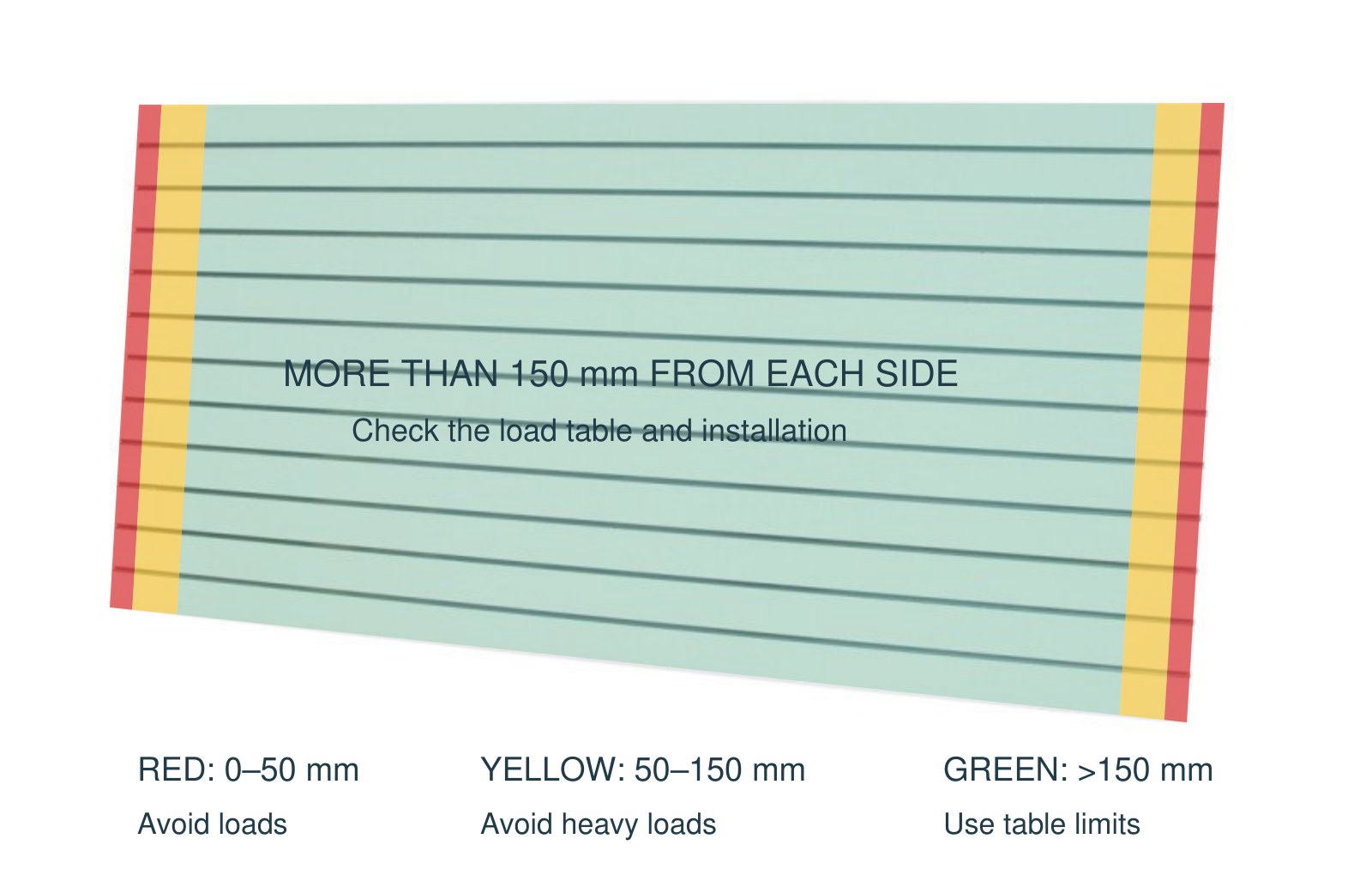 Shop Fittings Store slatwall product photograph with highlighted left and right side-edge zones. The overlays illustrate the Shop Fittings Store placement guidance below on a 2400 × 1200 mm panel. Measure distances on the installed panel, not from the picture.
Measure these distances inward from the left or right exposed side edge to the nearest part of the accessory’s engagement with the groove. These coloured setback zones apply to the side edges only; no top or bottom setback bands are specified here. At an exposed side end, less surrounding material is available to spread the force. Damaged grooves and unsupported joints still require assessment. Decorative edge trims do not remove this weakness.
A joint between sheets is not automatically equivalent to the interior of a continuous panel. Confirm the joint support before placing a heavy fixture nearby.
| Distance from nearest exposed side edge | Zone | Placement guidance |
|---|---|---|
| 0–50 mm | Red | Avoid loads. Keep loaded accessory engagement points outside this band. |
| More than 50 mm, up to 150 mm | Yellow | Avoid heavy loads. No numerical load rating is assigned to this band; confirm any proposed load with Shop Fittings Store. |
| More than 150 mm inward | Green | Preferred loading zone — check the aluminium load table and all installation limits. Green does not mean unlimited or automatically safe. |
07 Before loading your display
- Identify the assembly: panel material and thickness, groove profile, insert type and accessory compatibility.
- Check the support: use suitable fixings into structural studs or a verified masonry/support system. Follow SFS installation guidance; plasterboard alone is not a substitute for structural anchorage.
- Check the accessory: fully engage the hook or bracket; confirm its rating, condition and intended shelf depth.
- Weigh everything: include stock, shelf, bins, signage and fixtures. Check both the total mass and its distance from the wall.
- Check every limit: bracket, shelf, groove, panel and supporting wall. Include adjacent loaded accessories and shelves.
- Keep heavy loads inward: away from exposed panel side edges and, where practical, closer to the wall face.
- Inspect during use: unload immediately if there is cracking, loose fixings, groove damage, insert movement or excessive bending. Do not increase a load until damage appears.
Do not climb, hang from or shock-load a slatwall fixture. Customer impacts and repeated handling can impose forces beyond a static product load. For unusually heavy, deep or valuable displays, obtain confirmation for the complete installation.